
What's new
Car Wash Forum

This is a sample guest message. Register a free account today to become a member! Once signed in, you'll be able to participate on this site by adding your own topics and posts, as well as connect with other members through your own private inbox!

Which Nayax unit should I buy?

Majority of my customer's devices are set to $5.00 minimum.

Nayax statement on Fees:
Monthly - $7.95 - Covers all cellular (AT&T or Verizon in US) and backend sales reporting systems (cash, credit cards, and phone)

Processing – Assuming one can start at $5 and up to $25-$30, the fee is 2.5%+10 cents per transaction. If starting below $5 which would be air/vacs for example it would be a flat 5.95%. If it is a mix and one feels their average will be well over $5, then we would start at 5.95% and after 60 days or so we can do a look back and if the average is well over $5, we can roll the fee to 2.5%+10 cents.


I imagine higher fees would be associated with processor changes.
Pretty sure Nayax makes a "little bit" on the weekly float.
 
By the time the nayax deposit hits our account it's almost 1.5-2 weeks, they initiate transfer on a Friday for the previous week, and it usually hits our account Tues or Wed
 
By the time the nayax deposit hits our account it's almost 1.5-2 weeks, they initiate transfer on a Friday for the previous week, and it usually hits our account Tues or Wed
Mine's on Friday and it's in my account on Friday.
 
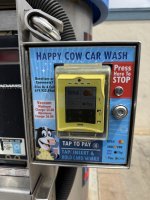
I'm wanting to purchase a Nayax unit for testing purposes. They offer the square shaped IP 55 rated VPOS which is tap, swipe, chip and will probably need the clear cover for the bays. They also offer the nice looking Onyx round unit that is tap only. I'm going to find out for sure, but it may be IP 65 rated and there is no plastic cover available for it from that I understand. We currently use Cryptopay swipers and the older style tap units on all SS bays, vacs, and spiral vender. The last time I checked we were something like close to 80% tap to swipe. Our Dencar kiosk has tap, chip, swipe and we get a lot of chip transactions. Most cards are now tap capable, and of course most people just use their phone to tap. I still have several cards that are not tap capable and I also do not have my phone set up for tap to pay. I'm going to set that up someday soon but it got me to thinking how many of my customers are in the same boat. I'm leaning towards the Onyx but I'm wondering how much business I might lose by not accepting chip if I even install Nayax on our equipment.
I'd probably lean toward the VPOS if you're worried about losing customers. Even if most people use tap now, there's always that one person with an old card who gets frustrated when they can't swipe or chip.
 
True!
On the VPOS Pulse Cable connect a normally open momentary contact switch:
Brown wire = VPOS GND
Light green wire = VPOS Door Open

Set parameters:
Device Features/Door Open Functionality = "As Cancel"
Pulse/ccTalk/Increment Source = "Door Open As Cancel"

View attachment 15181
I see you mentioned you’ve installed quite a bit of these. I’m really torn between this and the Tap Plus from Cryptopay. The VPOS offer a bit more I feel and it seems like they’ve improved their CS?

Also, of the roughly 100 you’ve done, how many have been fixed price va count up and in your opinion which is better? Thanks
 
Nayax CS has indeed improved significantly. In 2021 they were nearly impossible to deal with. Today's phone response time for technical support is quite good. But be prepared for the eastern European or Israeli accents.

I discuss the various pricing features and functions with each client during the onboarding process. Everyone chooses Count Up.
Multi-price operation, where the customer chooses from up to six selections, would be best installed for vacuums, air machines, shampooers.
Selections like
$2/2 Minutes
$4/4 Minutes
$5/10 Minutes
might generate higher revenues on those devices.
 
Also, I read on one of the car wash Facebook groups that you can change the default processor and then can be paid daily instead of weekly. Have any of you done that?
Easier said than done...

The only outside option I am aware of is to process directly through heartland. You do get daily deposits and you pay whatever rate you have set up with them. Nayax monthly fee still applies to the device.

The amount of work to get this setup done is an absolute pain (intermediary gateway required). Nayax doesn't want you to do it because they make more money if you go direct to them.
 
Isn't Nayax at 2.5%+ $.10 if your start price is $5?

If so, wouldn't that be the cheapest rates? Anyone know what the others are?
 
Easier said than done...

The only outside option I am aware of is to process directly through heartland. You do get daily deposits and you pay whatever rate you have set up with them. Nayax monthly fee still applies to the device.

The amount of work to get this setup done is an absolute pain (intermediary gateway required). Nayax doesn't want you to do it because they make more money if you go direct to them.
I just got off the phone with them. She said that they partnered with Heartland and is the only option. She thinks it can be set up with daily deposits but is looking into it for sure (along with many other answers I'm looking for).
 
I just got off the phone with them. She said that they partnered with Heartland and is the only option. She thinks it can be set up with daily deposits but is looking into it for sure (along with many other answers I'm looking for).

Contrary to how they present themselves, Nayax is simply a middle man (merchant service provider/ISO, etc) & runs all of their transactions through heartland/global payments which is why you are able to do this. No customer service rep at Nayax is going to know how to set this up without you doing the initial work.

You have to get a heartland account (which you will likely need another MSP or ISO to open) in addition to your Nayax account. Then get the buildout done by heartland. Then go to Nayax and have them make the connection when you have TID's in hand from heartland. Like I said, you are going to spend some time and effort to do this. Nayax just uses a gateway to connect their hardware to Heartland. This allows you to go around them and do it yourself.

Most of you just need to setup an account with Nayax like normal and ignore what I said above.

This can be applied to other companies hardware as well but be cautious if you backdoor things as you may lose some support aspect that you would otherwise have if you just stick to their recommended setup.
 
I currently have 86 Nayax POS I've installed on my sites, every unit for sure needs an external stop button (not included). After major growing pains & up and down the chain of tech support, they recommended external stop buttons because they have no resolution for the screen stop button malfunctions.

I also agree with AnalyticWash, it was a major pain in the butt to get all my units to be "Heartland Direct" for processing... we save a little $ on processing. BUT, main issue we did it for... we hated our customers seeing "NAYAX VENDING 69" on their bank statements... we had many calls/ complaints thinking their cards were 'hacked'. Now it says our business name as it should.

Also we were able to get the category for carwash on processing set. With nayax it was a vending food category. Some business customers would get declined because there business didn't allow their cards to be used for food.

we are happy with Nayax for sure - every unit count up.
 
I currently have 86 Nayax POS I've installed on my sites, every unit for sure needs an external stop button (not included). After major growing pains & up and down the chain of tech support, they recommended external stop buttons because they have no resolution for the screen stop button malfunctions.

I also agree with AnalyticWash, it was a major pain in the butt to get all my units to be "Heartland Direct" for processing... we save a little $ on processing. BUT, main issue we did it for... we hated our customers seeing "NAYAX VENDING 69" on their bank statements... we had many calls/ complaints thinking their cards were 'hacked'. Now it says our business name as it should.

Also we were able to get the category for carwash on processing set. With nayax it was a vending food category. Some business customers would get declined because there business didn't allow their cards to be used for food.

we are happy with Nayax for sure - every unit count up.
Do you have the covers for them? I'm assuming you have the VPOS and not the Onyx units. Do you have them on the vacs and vending machines?
 
BUT, main issue we did it for... we hated our customers seeing "NAYAX VENDING 69" on their bank statements... we had many calls/ complaints thinking their cards were 'hacked'. Now it says our business name as it should.

This is another big plus. Supposedly Nayax has a way to do this without going to Heartland but I have never pushed this issue.
 
Do you have the covers for them? I'm assuming you have the VPOS and not the Onyx units. Do you have them on the vacs and vending machines.

Yes, sorry VPOS* and yes we have covers on every unit except Vending / Water vendors. We have the luxury of space because we are reusing our old Wash Gear boxes with new doors. I know some people can’t use the covers if adding to smaller coin boxes.

I’d say I learned more from CantBreak80 posting on here than any CS at nayax 😂

Also I recommend using Ethernet connection when possible. Had many issues with cell connections. I skip their 16$ adapter and just add RJ9 handheld jack myself.
 

Attachments

  • IMG_1746.jpeg
    IMG_1746.jpeg
    2.1 MB · Views: 17
I’d say I learned more from CantBreak80 posting on here than any CS at nayax 😂

Aww! Thanks for the kind words!

Tip of the day…
When installing VPOS with the protective covers - use
4mm x 0.7mm x 25mm Stainless Steel Set Screws, washers, and nuts instead of the provided machine screws.
Snug the set screws into the VPOS – slip the protective cover on – slide the assembly onto your mounting surface and tighten the nuts with your 7mm nut driver/socket.

https://boltdepot.com/Product-Details?product=8720 (Set Screws)
https://boltdepot.com/Product-Details?product=4774 (Nuts)
https://boltdepot.com/Product-Details?product=4514 (Washers)

You can thank me later!:LOL:
 
Aww! Thanks for the kind words!

Tip of the day…
When installing VPOS with the protective covers - use
4mm x 0.7mm x 25mm Stainless Steel Set Screws, washers, and nuts instead of the provided machine screws.
Snug the set screws into the VPOS – slip the protective cover on – slide the assembly onto your mounting surface and tighten the nuts with your 7mm nut driver/socket.

https://boltdepot.com/Product-Details?product=8720 (Set Screws)
https://boltdepot.com/Product-Details?product=4774 (Nuts)
https://boltdepot.com/Product-Details?product=4514 (Washers)

You can thank me later!:LOL:
great idea - thanks!
 
Back
Top